
Backup and restore
The format and every detail of the restore procedures are in BACKUPS.md. This page is the operator's view.
Two keys are not in the backup
Backups are encrypted to an age recipient whose identity never goes on the server. keys.enc inside the backup is sealed with the master key, which lives in your vault. To recover from a lost server you need both. Keep them offline, apart from the backups.
What is backed up
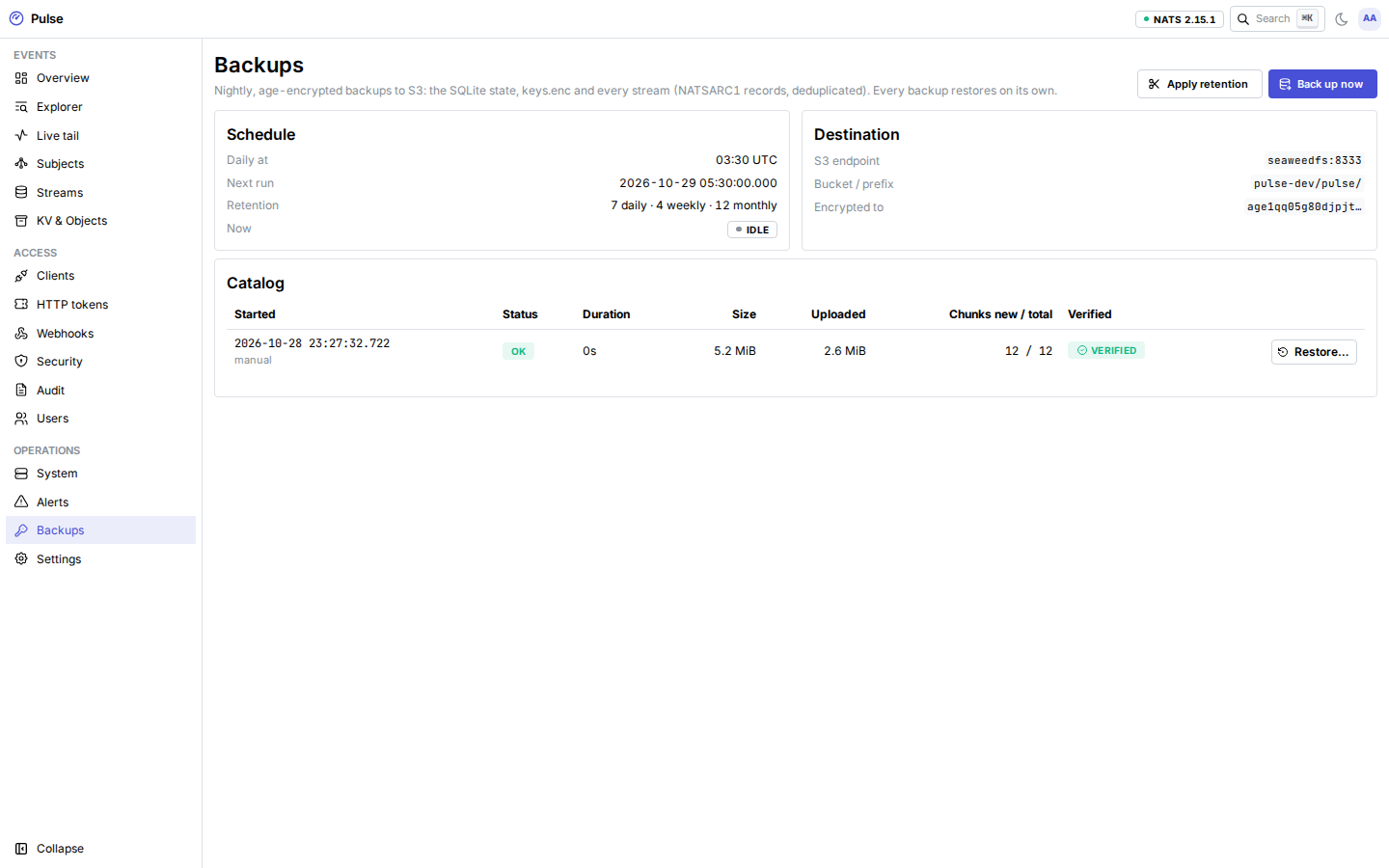
Every night at PULSE_BACKUP_AT (UTC, default 03:30), and whenever you press Back up now:
| What | How | Restore |
|---|---|---|
pulse.db: clients, grants, tokens, webhooks, bans, audit, alerts, rollups, settings | Online SQLite snapshot | Offline, pulsed backup restore --files |
keys.enc (still sealed with the master key) | The file as is | Offline, pulsed backup restore --files |
Every JetStream stream in the APP account: EVENTS, user streams, KV buckets, object stores | JetStream snapshots, consumers included | Online, from the dashboard or the CLI |
Restored streams keep their sequence numbers, stored timestamps, headers, payloads and durable consumer positions. Replaying "since a time" after a restore gives the same events as before. The restore drill test (make drill) checks this on every change to the backup code. Republishing events would not: they would get new timestamps.
How it is stored
Snapshots are split into chunks by sequence-number windows, compressed (S2) and encrypted with age, then uploaded to an S3-compatible bucket. Chunks are named by a keyed hash of their content, so an unchanged chunk is never uploaded twice: a quiet night uploads the newest window, the manifest and the database, yet every backup is a complete point-in-time snapshot.
- The storage provider sees encrypted chunks with opaque names, and a small plaintext
refs.jsonper backup (id, time, size, chunk names). It cannot read events or test guesses about their content. - age recipients are public, so someone with write access to the bucket could plant a forged object. pulsed checks every chunk's keyed name and length, every file's SHA-256 and the manifest's MAC (keyed from the master key) before it uses them.
- After each run pulsed lists the bucket and checks that every object the backup references exists ("verified").
- Retention: the newest backup of each of the last 7 days, 4 weeks and 12 months, plus always the newest. Chunks no kept backup references are then deleted.
Configure
On a trusted machine, create the age identity and keep it offline (two copies):
shpulsed backup keygen > backup-identity.txt # or: docker run --rm docker.io/aurimasniekis/pulsed:<version> backup keygen # stderr: recipient: age1…Create a bucket and an access key limited to list, get, put and delete on the prefix.
Configure pulsed (reference):
shPULSE_BACKUP_ENABLED=true PULSE_BACKUP_AGE_RECIPIENTS=age1… PULSE_BACKUP_S3_ENDPOINT=s3.example.com PULSE_BACKUP_S3_BUCKET=pulse-backups PULSE_BACKUP_S3_ACCESS_KEY_FILE=/run/secrets/s3_access_key PULSE_BACKUP_S3_SECRET_KEY_FILE=/run/secrets/s3_secret_key
Prefer a bucket with versioning or object lock. pulsed's retention deletes objects, so an attacker holding the server's S3 key could delete backups too.
Daily checks
- The Backups page shows each backup's status, size, what the run uploaded, and whether it is verified.
- The
backup_stalealert fires when the last backup failed or none succeeded for 36 hours. pulse backup lsshows the same catalog through the tunnel.- Metrics:
pulse_backups_total{result}andpulse_backup_uploaded_bytes_total.
Restore a stream or bucket
When a stream, KV bucket or object store was deleted or damaged, on the same server:
- Backups → pick a backup → Restore…
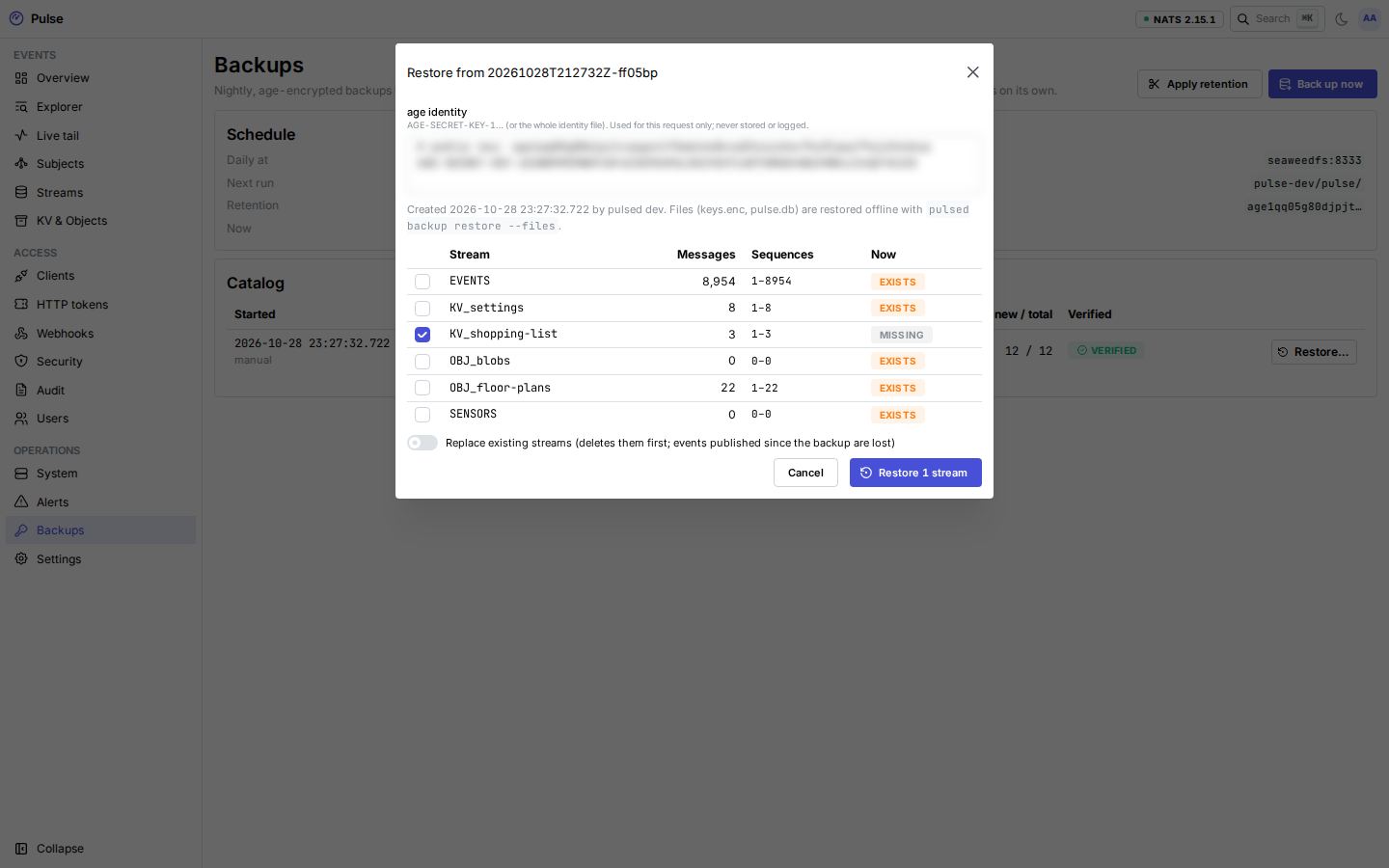
- Paste the age identity and choose Show contents: a dry run listing every stream, its message count and sequence range, and whether it exists now. The identity is used for that request only and never stored.
- Select streams. Existing streams are skipped unless Replace is on. Replace deletes them first (after every chunk was fetched and checked), and you type the backup id to confirm. Events published since the backup are then lost.
- Restore. Progress and per-stream results appear under Last restore.
From a terminal, through the tunnel, with a personal access token (restores need the administrator role):
pulse backup ls
pulse backup restore <id> --identity backup-identity.txt --streams KV_settings --dry-run
pulse backup restore <id> --identity backup-identity.txt --streams KV_settings
Without --streams every stream in the backup is restored; --replace replaces existing ones.
New server
With the same master key (from your vault) and the same S3 settings in the compose file:
# 0. The container runs as uid 65532: give it a readable copy of the identity.
sudo install -m 0400 -o 65532 backup-identity.txt id.txt
# 1. Before the first start: restore pulse.db and keys.enc, so every client's credentials keep working.
docker compose run --rm --no-deps -v ./id.txt:/tmp/id.txt:ro pulsed \
  backup list --identity /tmp/id.txt
docker compose run --rm --no-deps -v ./id.txt:/tmp/id.txt:ro pulsed \
  backup restore --id <id> --identity /tmp/id.txt --files
# 2. Start the stack. init renders nats.conf from the restored keys; pulsed pushes the accounts to NATS.
docker compose up -d
# 3. Restore the streams.
docker compose run --rm --no-deps -v ./id.txt:/tmp/id.txt:ro pulsed \
  backup restore --id <id> --identity /tmp/id.txt --all
Delete id.txt from the server afterwards (sudo rm id.txt). Restoring EVENTS takes as much disk and time as the stream's size. Rollups resume from their checkpoints in the restored pulse.db, because sequence numbers are preserved.
Rehearse this on a scratch VM after major changes, and record how long it took.
Limits
- Deleting single messages inside a sequence window changes that window's chunk, which is uploaded again. Purges and discard-old only move the first sequence forward.
- A backup, a prune and a restore never run at the same time; a second request gets 409.
- Backups happen once a day. Events published since the last backup are lost with the server.
- Restore times on the reference VPS have not been measured yet.